



How to Fix X (Twitter) Human Verification Issues in 2026 | Complete Guide for Creators & Marketers
Why Does X Show "Let's Confirm You're Human"?
If you've recently tried to log into an X (formerly Twitter) account and were greeted with a QR code asking you to confirm you're human, you're certainly not the only one.
Over the past few years, X has continuously strengthened its account security systems to combat spam, fake engagement, automated abuse, and large-scale account hijacking. As a result, even legitimate users, marketers, and businesses may occasionally be asked to complete additional verification before accessing their accounts.

In most cases, this doesn't mean your account has been suspended or permanently restricted. Instead, it's simply a security checkpoint designed to verify that the login activity appears legitimate.
X's verification system primarily aims to:
Protect user accounts from unauthorized access
Reduce spam and fake engagement
Detect unusual login behavior
Limit large-scale automated abuse
For users managing multiple X accounts, these security checks can become increasingly common, especially when account environments are not managed consistently.
Managing multiple X accounts?
Keeping login environments organized is one of the easiest ways to reduce unnecessary verification prompts. TweetAttacksPro helps teams manage accounts, scheduling, content creation, and account workflows from a single dashboard while maintaining a more consistent operating process. See how TweetAttacksPro helps manage multiple X accounts →
Common Reasons Why Human Verification Appears
Understanding what triggers X's human verification system is the first step toward preventing it in the future.
1. Frequent IP Address Changes
One of the most common reasons is frequent IP switching.
For example:
Logging in from different countries within a short period
Frequently changing VPN servers
Using unstable or rotating proxy networks
Switching between multiple network environments throughout the day
From X's perspective, these behaviors may resemble account compromise or suspicious activity, even when performed by the legitimate account owner.
Whenever possible, maintain a stable login environment and avoid unnecessary IP changes for the same account.
2. Excessive or Unnatural Account Activity
X continuously evaluates account behavior—not just individual actions.
Activities that may increase your account's risk score include:
Following large numbers of users within a short timeframe
Sending excessive Direct Messages
Publishing posts too frequently
Mass liking or reposting content
Performing repetitive actions across multiple accounts
None of these actions are necessarily prohibited. However, when they occur too quickly or too consistently, they may appear automated and trigger additional security verification.
Gradual, human-like activity patterns generally produce healthier long-term account performance.
3. Newly Created Accounts Showing Aggressive Behavior
New X accounts receive closer security monitoring than established accounts.
If a brand-new account immediately begins:
Following hundreds of users
Publishing dozens of posts
Sending large numbers of Direct Messages
Performing high-frequency engagement actions
the platform may classify the behavior as unusually aggressive and request additional verification.
A gradual account warm-up strategy is generally safer than attempting to scale activity immediately after registration.
4. Multiple Accounts Sharing the Same Operating Environment
This is one of the most common situations affecting marketers, agencies, and businesses managing multiple X accounts.
When numerous accounts are repeatedly:
Logged in from the same IP address
Accessed through identical browser environments
Operated on the same device
Used with nearly identical activity patterns
X's risk detection systems may determine that these accounts are strongly associated, increasing the likelihood of security verification requests.
For teams managing multiple accounts, maintaining organized account environments and consistent workflows becomes increasingly important as the number of accounts grows.
5. Browser Fingerprints Matter More Than Many People Realize
Many users focus only on proxies, but modern anti-abuse systems evaluate much more than your IP address.
Additional signals may include:
Browser fingerprints
Device characteristics
Operating system information
Cookies and stored sessions
Time zones and language settings
Login history
Overall behavioral patterns
In other words, using a high-quality proxy alone does not guarantee a trusted account environment. Maintaining consistency across your overall browsing environment is equally important for reducing unnecessary verification requests.
How to Fix the "Let's Confirm You're Human" Verification Screen
If you're already stuck on the "Let's Confirm You're Human" page, don't panic. In most cases, the issue can be resolved by following X's official verification process and restoring a consistent login environment.
Here are the most effective approaches.
Solution 1: Scan the QR Code
This is the official and most reliable solution.
Simply:
Open your phone's camera.
Scan the QR code displayed on the screen.
Complete the verification process.
Return to your browser and continue logging in.
For most users, this resolves the issue within a few minutes.
Solution 2: Verify Through the X Mobile App
If the account is already signed in on your mobile device, the verification process is often much smoother.
Try the following:
Open the X mobile app.
Confirm that the account is still logged in.
Keep the app open for a few moments.
Retry logging in from your browser.
In many cases, X recognizes the trusted mobile session and allows the browser login to proceed without additional verification.
Solution 3: Restore a Stable Login Environment
If you're repeatedly encountering the same verification screen, your login environment may appear inconsistent.
Before trying again:
Log out of the account.
Clear your browser's cookies and cache.
Use a stable, reputable residential internet connection.
Avoid switching VPNs or proxy locations repeatedly.
The goal is not to bypass X's security systems, but to provide a consistent environment that matches your normal account usage.
Solution 4: Wait Before Trying Again
Repeated login attempts within a short period may unintentionally increase your account's risk level.
If previous attempts have failed:
Stop logging in repeatedly.
Wait several hours before trying again.
Resume normal account activity gradually.
Giving the account time to cool down is often more effective than repeatedly refreshing the verification page.
Can CAPTCHA-Solving Services Fix the Problem?
Many users wonder whether third-party services such as:
2Captcha
Anti-Captcha
CapMonster
DeathByCaptcha
can solve X's human verification challenge.
Unfortunately, the answer is not consistently.
Unlike traditional CAPTCHA systems that simply require solving an image or puzzle, X evaluates a much broader range of trust signals.
These may include:
Login history
Device consistency
Browser fingerprints
Network reputation
Overall account behavior
In other words, the verification challenge is usually not about solving a CAPTCHA—it is about determining whether the login activity appears trustworthy.
For that reason, CAPTCHA-solving services alone rarely provide a long-term solution.
How to Reduce Human Verification Requests in the Future
While no method can completely eliminate verification requests, following good account management practices can significantly reduce the likelihood of seeing them.
1. Use a Stable Internet Connection
Avoid frequently switching between different countries, networks, or IP environments.
A consistent login history generally creates a stronger trust profile over time.
2. Keep Account Environments Consistent
Whenever possible, maintain a consistent relationship between each account and its operating environment.
For example:
Account A → Environment A
Account B → Environment B
Account C → Environment C
The more consistently each account is managed, the easier it is to avoid unnecessary security checks.
Managing dozens or even hundreds of X accounts?
Keeping account environments organized manually quickly becomes difficult. TweetAttacksPro provides centralized account management, scheduling, AI-assisted content creation, and activity monitoring to help teams manage large numbers of accounts more efficiently. Explore TweetAttacksPro's features →
3. Warm Up New Accounts Gradually
New accounts should establish a normal usage pattern before performing large amounts of activity.
A safer approach is to:
Follow users gradually.
Publish posts at a natural pace.
Interact with relevant content.
Build account history over time.
Gradual growth is generally more sustainable than aggressive activity immediately after account creation.
4. Avoid Repetitive Activity Patterns
Automation itself is not necessarily the issue.
What platforms often detect is repetitive or unrealistic behavior.
Examples include:
Performing identical actions across many accounts
Running actions at perfectly fixed intervals
Repeating the same workflow continuously
Whether actions are performed manually or with software, maintaining natural-looking activity patterns is always a better long-term strategy.
5. Monitor Account Health Regularly
Many account issues develop gradually before verification challenges ever appear.
Regularly reviewing factors such as:
Login consistency
Posting frequency
Engagement activity
Account status
can help identify potential risks earlier and make it easier to maintain stable account operations over time.
Managing Multiple X Accounts More Efficiently
If you only manage one or two X accounts, maintaining a consistent login environment is usually straightforward.
However, the situation becomes much more challenging as the number of accounts grows.
Marketing teams, agencies, and businesses often need to manage dozens—or even hundreds—of accounts simultaneously. Keeping track of which account belongs to which browser profile, network environment, posting schedule, and activity history quickly becomes a time-consuming task.
A well-organized workflow not only improves efficiency but also helps reduce operational mistakes that may lead to unnecessary security challenges.
The comparison below highlights the difference between managing multiple accounts manually and using a centralized management platform.
| Manual Management | Using TweetAttacksPro |
|---|---|
| Organize accounts manually | Centralized multi-account management |
| Remember login environments for every account | Keep account workflows organized from one dashboard |
| Schedule posts one account at a time | Schedule content across multiple accounts |
| Create posts manually | Built-in AI Tweet Generator |
| Check account activity individually | Monitor account activity from a unified dashboard |
| Switch between multiple browser windows | Manage multiple workflows more efficiently |
It's important to note that TweetAttacksPro does not bypass X's security systems or human verification process.
Instead, it helps teams build more organized workflows for account management, content scheduling, and day-to-day operations, making it easier to maintain consistent account activity as they scale.
If you're managing multiple X accounts professionally, having a centralized workflow can save significant time while reducing unnecessary operational errors.
👉 Explore TweetAttacksPro and see how it can simplify multi-account management.
Why Teams Choose TweetAttacksPro
Managing a handful of X accounts is relatively straightforward. However, as your operation grows, maintaining consistency across dozens or hundreds of accounts becomes increasingly challenging.
Instead of relying on spreadsheets, multiple browser windows, or manual reminders, many marketers, agencies, and businesses prefer using a centralized platform to streamline their daily workflows.
TweetAttacksPro is designed to simplify large-scale X account management by bringing everything together in one place.
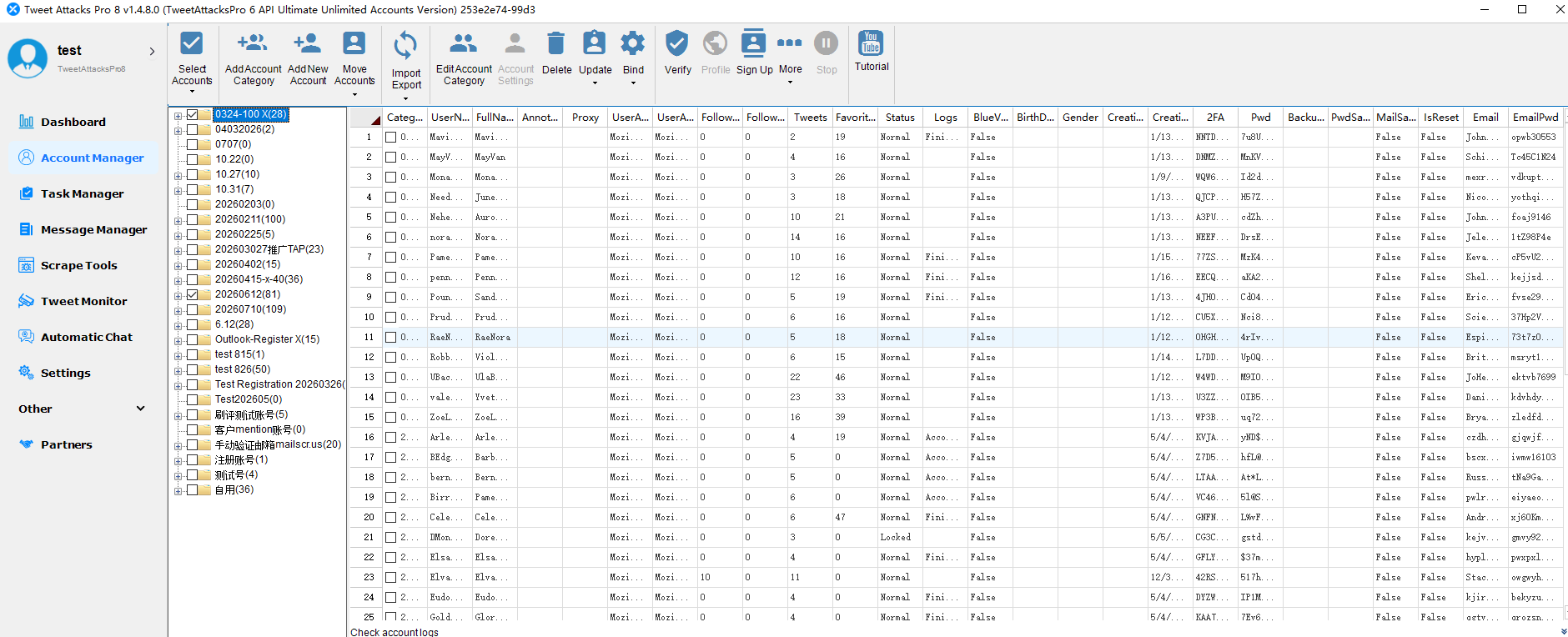
Centralized Account Management
Manage all of your X accounts from a single dashboard, making it easier to organize account information, monitor status, and manage daily operations efficiently.
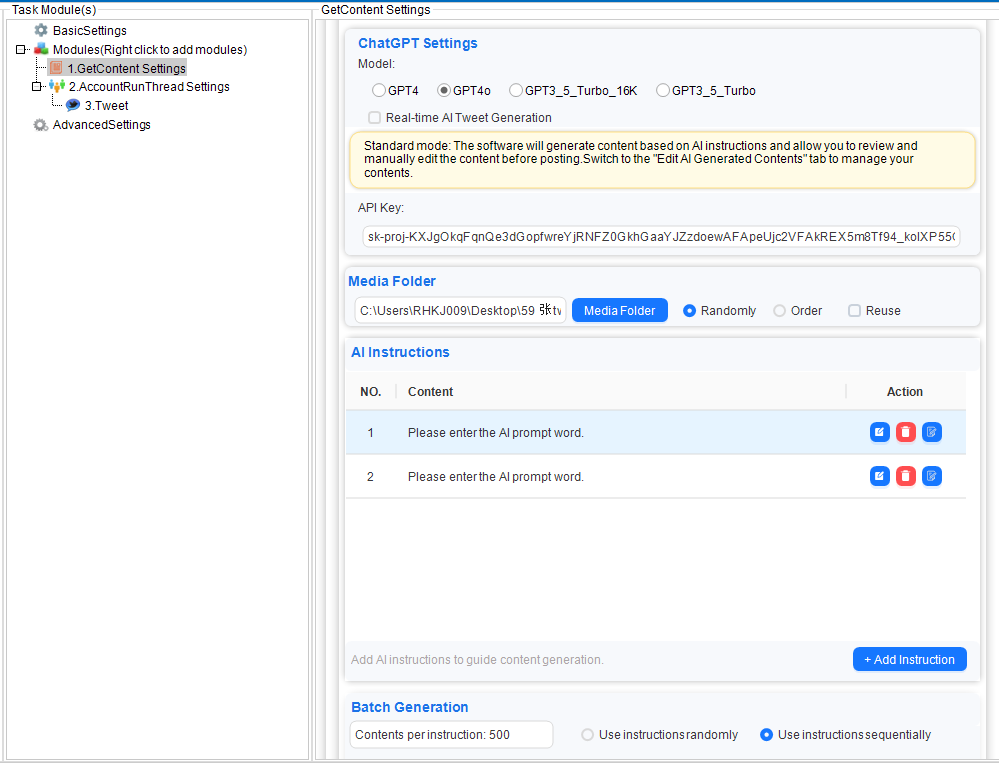
AI-Powered Content Creation
Generate high-quality tweets with the built-in AI Tweet Generator, rewrite existing content, and create engaging posts more efficiently while maintaining a natural publishing workflow.
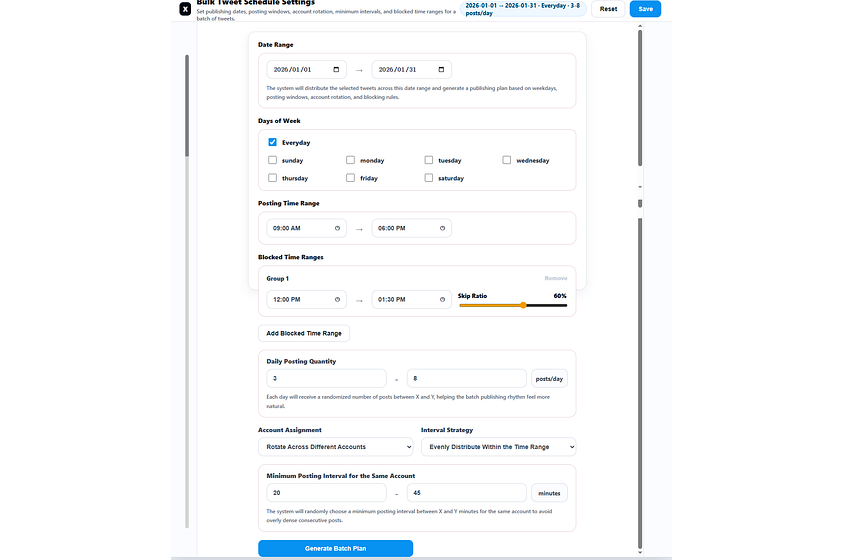
Smart Scheduling
Plan and schedule content in advance for multiple accounts, helping maintain consistent posting activity without constantly switching between accounts.
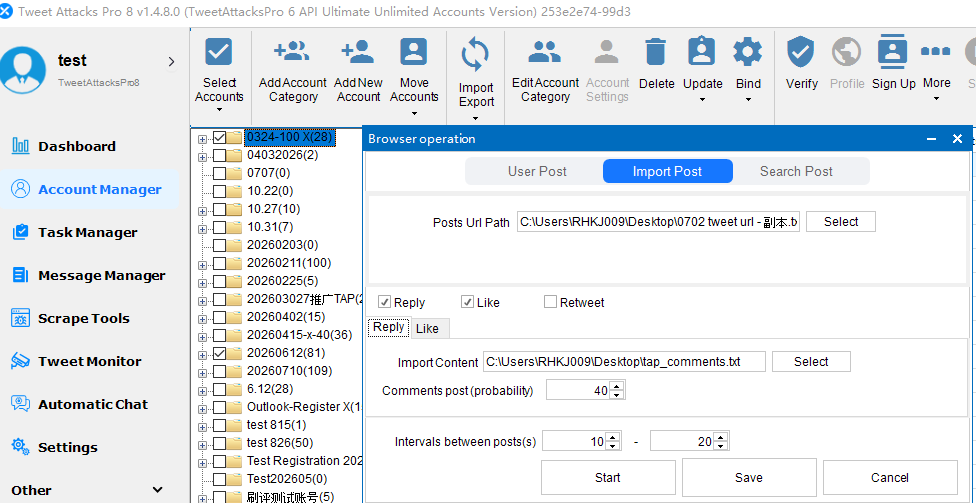
Browser-Based Engagement
Perform browser-based actions such as viewing posts, liking, commenting, reposting, and following through an organized workflow designed for day-to-day account management.
Analytics and Account Monitoring
Track account activity, monitor operational status, and review campaign performance from one unified dashboard, making it easier to manage growing account portfolios.
Built for Professional X Account Management
Whether you're managing personal brands, agency clients, affiliate marketing campaigns, or business accounts, organizing your workflow becomes increasingly important as your operation grows.
While no software can prevent X from requesting official security verification, maintaining a well-structured account management process can help teams work more efficiently and reduce unnecessary operational mistakes.
If you're looking for a professional solution to manage multiple X accounts, explore what TweetAttacksPro has to offer.
👉 Explore TweetAttacksPro Features →
Frequently Asked Questions
Can TweetAttacksPro bypass human verification?
No.
TweetAttacksPro does not bypass X security systems.
Instead, it helps users organize account management, scheduling, and content workflows more efficiently.
Does TweetAttacksPro solve QR verification?
No.
If X requires identity verification, users should complete the official verification process.
Can better account management reduce verification frequency?
Keeping login environments consistent and avoiding risky account behavior may help reduce unnecessary verification prompts, although X ultimately determines when verification is required.
Final Thoughts
Encountering the "Let's Confirm You're Human" verification page can be frustrating, but in most cases it doesn't mean your account has been permanently restricted.
More often, it's simply X's way of confirming that your login activity and account behavior appear trustworthy.
By maintaining consistent account environments, using stable internet connections, warming up new accounts gradually, and following responsible account management practices, you can significantly reduce the likelihood of unnecessary verification requests over time.
For individuals managing only a few accounts, these practices are usually easy to maintain manually.
However, for marketers, agencies, and businesses operating dozens or even hundreds of X accounts, keeping everything organized becomes increasingly difficult.
That's where a centralized management platform can make a real difference.
TweetAttacksPro helps streamline multi-account management, AI-powered content creation, browser-based engagement, scheduling, and analytics—allowing teams to focus more on growing their X presence and less on repetitive daily operations.
If you're looking for a more efficient way to manage multiple X accounts, explore TweetAttacksPro's features or download the free version to see how it fits your workflow.