



How to Warm Up an X (Twitter) Account Safely | Complete Guide + TweetAttacksPro Warm-Up Tool
How to Warm Up an X (Twitter) Account Safely: The Complete Guide
Why Every X Account Needs Warm-Up Before Automation
Many beginners make the same mistake.
They create a new X account—or buy an aged one—and immediately begin following hundreds of users, liking dozens of posts, sending direct messages, or publishing promotional tweets.
From X's perspective, this behavior doesn't resemble a normal person. Instead, it may look like an automated account attempting to manipulate engagement.
As a result, the account may experience:
- Reduced reach
- Temporary restrictions
- Action limits
- Failed follow or like actions
- Increased verification requests
- In severe cases, suspension
This is exactly why experienced marketers always perform X account warm up before launching any automation campaign.
Think of warm-up as building trust with the platform.
Instead of acting like a bot, the account gradually behaves like a genuine user by browsing content, searching for topics, liking tweets, reading discussions, and occasionally commenting.
Over time, this creates a much more natural activity pattern.
What Is X Account Warm Up?
Twitter account warm up is the process of gradually increasing account activity so the account develops a normal behavioral history.
Rather than immediately performing aggressive marketing actions, the account first completes activities that millions of real users perform every day.
Examples include:
- Searching for keywords
- Browsing tweets
- Reading conversations
- Opening user profiles
- Liking tweets
- Leaving natural comments
- Scrolling timelines
- Spending realistic time on the platform
The objective isn't simply increasing engagement.
The goal is making the account appear like a genuine human user.
Why Automated Warm-Up Is Better Than Manual Warm-Up
If you're managing only one account, manual warm-up is possible.
But many marketers manage:
- 20 accounts
- 100 accounts
- 500 accounts
- 1,000+ accounts
Opening every browser manually every day quickly becomes impractical.
This is where Twitter account warm up software becomes valuable.
Instead of repeating the same routine yourself, automation can simulate consistent browsing behavior while saving significant time.
The key is making that automation appear natural rather than repetitive.
Introducing TweetAttacksPro Warm-Up Module
TweetAttacksPro includes a dedicated Account Warm-Up module designed specifically for X account warming.
Instead of simply running likes or comments in bulk, the module simulates realistic browsing behavior before performing engagement actions.
A typical warm-up session looks like this:
- Search for a keyword.
- Browse matching tweets.
- Scroll naturally.
- Randomly open posts.
- Randomly like selected tweets.
- Randomly comment according to your settings.
- Continue browsing until the configured warm-up duration ends.
Because every action contains randomness, different accounts naturally generate different behavior patterns.
This significantly reduces repetitive automation footprints compared with fixed scripts.
Why Random Behavior Matters
Real users never repeat identical actions every day.
For example:
Day 1
- Search "AI"
- Like 6 tweets
- Comment on 2 tweets
- Browse for 18 minutes
Day 2
- Search "Football"
- Like 9 tweets
- Browse for 27 minutes
Day 3
- Search "Crypto"
- Comment once
- Browse profiles
- Like 4 tweets
This variation is what makes human behavior look authentic.
TweetAttacksPro introduces controlled randomness into the warm-up workflow so activities vary from session to session rather than following a rigid sequence.
Warm-Up Time Explained
One of the most important settings is Warm-up Time.
What It Does
Warm-up Time determines how long each warm-up session lasts.
For example:
- 10 minutes
- 20 minutes
- 30 minutes
- 45 minutes
During this period, TweetAttacksPro continuously performs natural browsing actions according to your configuration.
The timer controls the overall session duration rather than a fixed number of likes or comments.
Recommended Settings
For newly created accounts:
- 10–20 minutes
For aged accounts:
- 20–40 minutes
For trusted long-term accounts:
- 30–60 minutes
Longer sessions generally resemble real users more closely than very short bursts of activity.
Loop Run and Interval (m)
This setting allows the warm-up task to repeat automatically.
If Disabled
The warm-up runs only once.
For example:
Warm-up Time = 20 minutes
The software performs one 20-minute warm-up session and then stops.
This is useful when testing new settings or performing occasional maintenance.
If Enabled
The software continues running in a loop.
Example:
Warm-up Time = 20 minutes
Interval = 60 minutes
The workflow becomes:
- Warm up for 20 minutes
- Wait 60 minutes
- Warm up again for 20 minutes
- Wait another 60 minutes
- Repeat continuously
This creates activity throughout the day instead of concentrating all actions into one session.
From a behavioral perspective, distributed activity generally appears more natural than long, uninterrupted bursts.
Why Interval Matters
Many beginners assume that running automation continuously for several hours is the safest option.
In practice, spreading activity across multiple sessions often creates a more balanced usage pattern.
For example:
❌ Continuous activity:
9:00–12:00 nonstop
✔ Better pattern:
9:00–9:20
10:30–10:50
1:00–1:20
4:00–4:20
The second approach more closely resembles how real users return to the platform several times throughout the day rather than remaining constantly active.
Show Browser
Another important setting in the TweetAttacksPro Account Warm-Up module is Show Browser.
Although it looks simple, this option gives you flexibility depending on how you prefer to run your automation tasks.
What Does Show Browser Do?
If Show Browser is enabled, TweetAttacksPro launches a visible browser window and performs every action on the screen.
You can watch the account:
- Search keywords
- Scroll the timeline
- Open tweets
- Like posts
- Comment on tweets
- Browse profiles
This mode is ideal if you want to monitor the warm-up process or verify that everything is working exactly as expected.
When Show Browser Is Disabled
If the option is unchecked, TweetAttacksPro performs the same warm-up actions in the background without opening a visible browser window.
The software continues to:
- Search tweets
- Browse content
- Like posts
- Leave comments
The only difference is that these actions run silently while you continue working on other tasks.
This is especially useful when managing dozens or even hundreds of X accounts simultaneously.
Which Mode Should You Choose?
Both modes perform the same warm-up logic.
Generally:
Use Show Browser when:
- Testing a new workflow
- Checking account behavior
- Learning how the warm-up process works
- Demonstrating the software
Run in Background when:
- Managing multiple accounts
- Running scheduled tasks
- Performing long-term account maintenance
- Saving desktop space and reducing interruptions
The choice depends on your workflow rather than account safety.
Use Search Keywords
One of the smartest features inside TweetAttacksPro is Use Search Keywords.
Instead of interacting with completely random tweets, the software searches for topics that you specify.
How It Works
Simply add or import multiple keywords into the software.
For example:
- AI
- Crypto
- Football
- Marketing
- Startup
- Travel
- Technology
- Music
- Fitness
During each warm-up session, TweetAttacksPro randomly selects one keyword and searches X for related posts.
It then browses those search results naturally before performing engagement actions.
Random Keyword Selection Creates More Natural Behavior
Imagine a real X user.
Nobody searches for the exact same keyword every single day.
Instead, interests change naturally.
Today's search:
AI Tools
Tomorrow:
Football News
Next week:
Travel Tips
TweetAttacksPro reproduces this behavior by randomly selecting keywords from your list.
This avoids repetitive activity patterns while making account behavior more diverse.
Random Like and Comment Actions
After locating tweets through keyword search, TweetAttacksPro can randomly perform engagement actions according to your settings.
These include:
- Like tweets
- Comment on tweets
- Browse tweet details
- Scroll naturally
- Continue reading related content
Importantly, the software does not simply interact with every tweet it encounters.
Instead, it randomly selects posts based on your configured behavior.
This randomness helps avoid predictable action sequences.
Why Keyword-Based Warm-Up Is Better Than Fixed Targets
Many automation tools repeatedly interact with the same users or the same tweet lists.
That approach can quickly become repetitive.
TweetAttacksPro uses keyword discovery instead.
Benefits include:
- Constantly discovering fresh content
- More diverse engagement
- Broader browsing history
- More realistic user behavior
- Better simulation of genuine platform usage
As a result, accounts appear to behave more like ordinary users who browse topics they're interested in rather than repeatedly visiting identical pages.
Recommended Warm-Up Strategy for New X Accounts
If you've just created a new account, avoid aggressive automation.
A gradual approach is generally safer.
Days 1–3
- Warm-up Time: 10–15 minutes
- Loop Run: Disabled
- Likes: Low volume
- Comments: Optional
- Focus on browsing and searching
Days 4–7
- Warm-up Time: 20–30 minutes
- Enable Loop Run
- 2–4 sessions per day
- Increase browsing diversity
- Add more keywords
After One Week
Once the account has built a consistent activity history, you can gradually begin using additional TweetAttacksPro features such as:
- Posting tweets
- Following users
- AI-generated comments
- AI tweet generation
- Scheduled publishing
- Direct messaging (used responsibly)
The key is gradual progression rather than immediate high-volume activity.
TweetAttacksPro Warm Up Function Settings
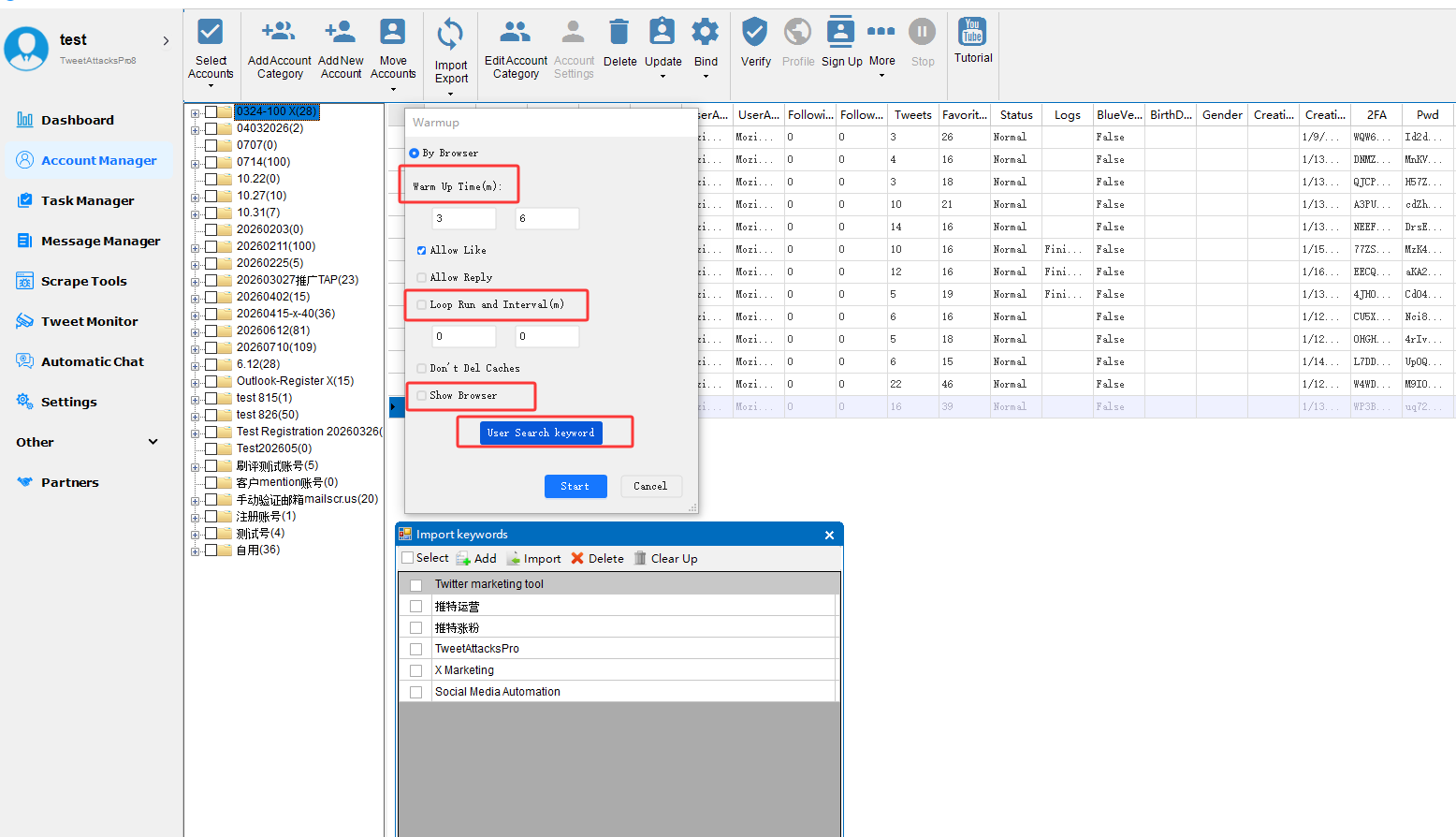
Warm-up Time:
The duration of each warm-up session (minutes).
Loop Run and Interval (m):
If unchecked, the task runs only once for the Warm-up Time specified above.
If checked, the task runs continuously in a loop. The interval between each run is the number of minutes set here, and each run lasts for the Warm-up Time you specified.
Show Browser:
If checked, the task runs in a visible browser window. If unchecked, the task runs silently in the background without opening a visible browser.
Use Search Keywords:
Add or import multiple keywords here. The software will randomly select a keyword to search for posts, then randomly Like and/or Comment on the matching posts based on your settings.
Recommended Strategy for Aged Accounts
Older accounts generally require less intensive warming, but they still benefit from ongoing maintenance.
Suggested settings:
- Warm-up Time: 20–40 minutes
- Loop Interval: Every 1–3 hours
- Diverse keyword list
- Random likes
- Occasional comments
- Daily browsing sessions
Maintaining periodic activity helps keep accounts active between larger marketing campaigns.
Best Practices for Managing Multiple Accounts
If you're running dozens or hundreds of X accounts, consistency and diversity matter.
Here are some practical recommendations:
- Use different keyword lists for different account groups.
- Stagger warm-up sessions throughout the day.
- Avoid identical schedules across all accounts.
- Vary warm-up durations instead of using one fixed value.
- Mix browsing, likes, and comments naturally.
- Regularly update your keyword library with trending topics relevant to your niche.
These practices help create more varied activity patterns across your account portfolio.
Common Mistakes to Avoid
Many users accidentally reduce account quality by following poor automation practices.
Avoid these common mistakes:
- Running automation immediately after account creation.
- Using only one keyword repeatedly.
- Warming up for many hours without breaks.
- Running every account on the exact same schedule.
- Posting promotional content before establishing normal activity.
- Interacting with too many tweets in a short period.
- Ignoring account age when configuring automation.
- Never refreshing keyword lists.
- Performing identical actions every day.
- Treating automation as a replacement for thoughtful account management.
Warm-up should build a natural activity history—not maximize engagement in the shortest possible time.
Frequently Asked Questions (FAQ)
What is X account warm up?
X account warm up is the process of gradually building normal account activity before running larger automation or marketing campaigns. It typically includes searching, browsing, liking, and other natural interactions.
How long should I warm up a new Twitter account?
For most new accounts, 10–20 minutes per session over several days is a reasonable starting point. Activity can then be increased gradually as the account develops a consistent history.
Can TweetAttacksPro automate Twitter account warm up?
Yes. TweetAttacksPro automates keyword searches, browsing, random likes, and optional comments while allowing you to control session duration, looping behavior, intervals, and browser mode.
Does TweetAttacksPro support background warm-up?
Yes. You can choose between a visible browser or background execution, depending on your workflow.
Why should I use keyword searches during warm-up?
Keyword-based browsing helps create more varied and realistic activity by discovering different conversations and content instead of repeatedly interacting with the same tweets or users.
Final Thoughts
Successful X marketing doesn't begin with mass posting or aggressive automation—it begins with preparation.
A well-warmed account is more likely to behave consistently over time than one that immediately performs high-volume actions.
TweetAttacksPro's Account Warm-Up module is designed to simplify that preparation. By combining configurable warm-up durations, looping sessions, background execution, keyword-based discovery, and randomized engagement, it helps you automate routine account activity while maintaining flexibility in how sessions are scheduled.
Whether you're managing a handful of accounts or a larger portfolio, establishing a thoughtful warm-up routine can become an important part of your overall X marketing workflow.
Try TweetAttacksPro Free
Want to experience automated X account warm-up yourself?
The free version of TweetAttacksPro lets you explore many of its core automation features before upgrading, making it easy to test workflows and see how the platform fits your marketing process.
Download TweetAttacksPro Free today and start building healthier, more active X accounts with smarter automation.